PHORM — Reactive Streams & Real-time Watchers
PHORM features a robust, state-of-the-art reactive architecture that enables your UI to update in real time as the database changes. You can watch single records or entire datasets using simple stream-based APIs.
How It Works Under the Hood
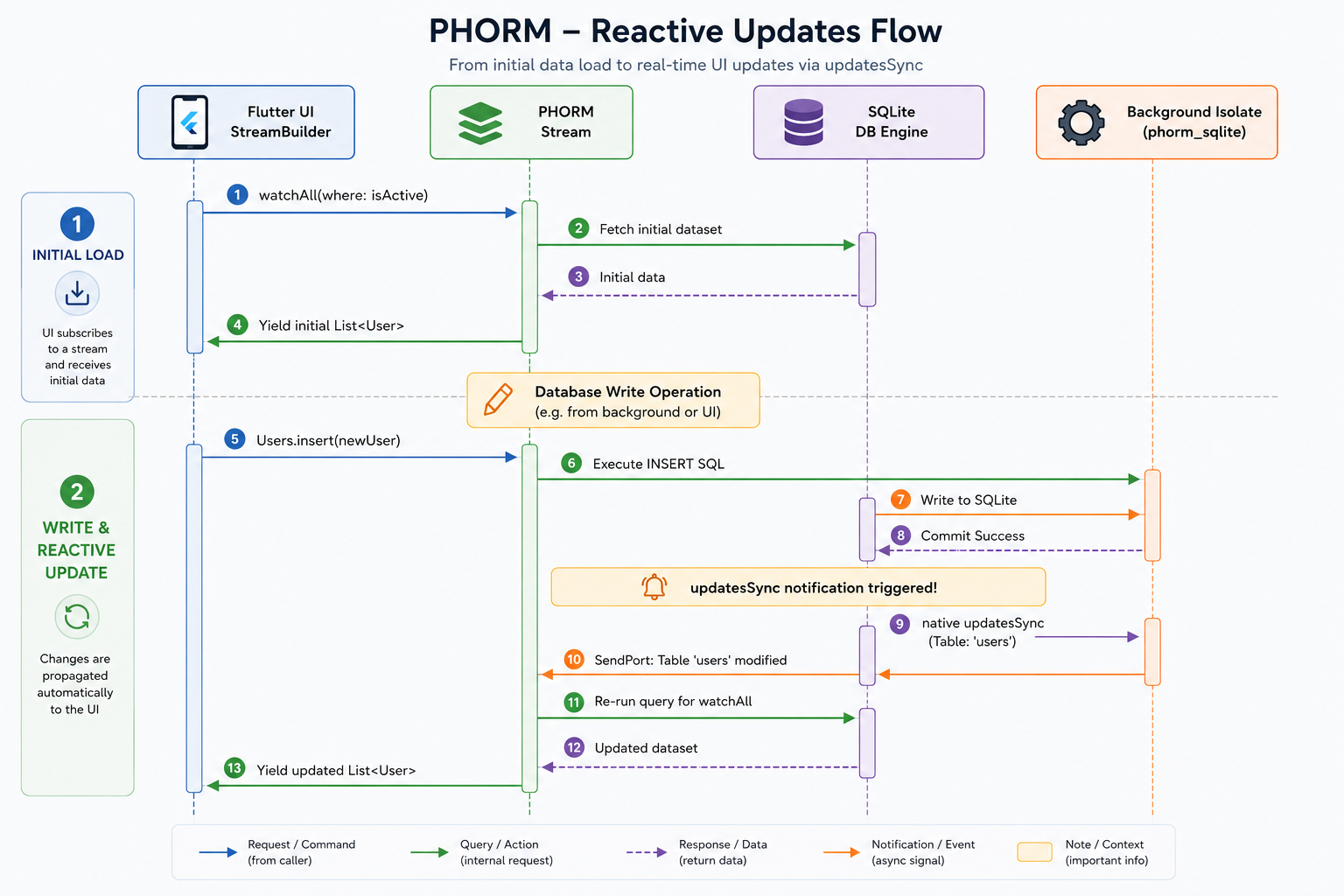
Unlike traditional ORMs that require manual hooks, observers, or trigger methods on every write, PHORM leverages native database-level notifications. The actual implementation details depend on the active database dialect:
- Dialect-Specific Notifications (
changeStream): - SQLite (
phorm_sqlite): PHORM listens to the nativeupdatesSyncstream provided by thesqlite3driver. This stream receives notifications directly from the SQLite engine whenever any table is modified (viaINSERT,UPDATE, orDELETE), even if those modifications happen through raw SQL executions. - PostgreSQL / Other Dialects: Reactivity uses database-native pub-sub/notification systems (such as
LISTEN/NOTIFYin PostgreSQL) or driver-level statement hooks to capture mutations. - Isolate-Safe Dispatching: For client-side drivers (like SQLite), these events are captured in the background database isolate and synchronously sent to the main isolate via
SendPort. - Transaction Buffering: If writes occur within a transaction, notifications are buffered at the database level and are only emitted once the transaction commits successfully. If the transaction rolls back, all buffered notifications are discarded. This prevents redundant notifications and eliminates UI flickering during bulk operations.
Reactive APIs
PhormCore<T> provides two primary methods to watch data changes:
1. watchOne(id)
Watches a single record by its primary key. Emits the initial record immediately, and then re-emits the updated record whenever the table (or its dependencies) changes.
// Watch a user with ID '123'
final Stream<User?> userStream = Users.watchOne('123');

userStream.listen((user) {
  if (user != null) {
    print('User updated: ${user.firstName}');
  } else {
    print('User deleted');
  }
});
2. watchAll()
Watches a dataset. Emits the initial list immediately, and re-emits a fresh list of matching records whenever the target table (or its dependencies) changes.
// Watch all active users
final Stream<List<User>> activeUsersStream = Users.watchAll(
  where: Users.isActive.eq(true),
);

activeUsersStream.listen((users) {
  print('Total active users: ${users.length}');
});
Dependency Tracking & Deep Watching
Often, models contain relationships (e.g., a User has many Posts). If you display a list of users with their posts, you want the UI to update not only when a user changes, but also when a post belonging to a user is inserted, updated, or deleted.
PHORM solves this beautifully through Dependency Tracking:
Automatic Include-based Dependencies
When using include to load relations, PHORM automatically detects all related tables and registers them as dependencies for the stream.
// PHORM automatically registers 'posts' as a dependency because of the include block.
// If any post is inserted, updated, or deleted, this stream will automatically re-emit!
final Stream<User?> userWithPosts = Users.watchOne(
  'u1',
  include: [Includable.table('posts')],
);
Explicit Dependencies
If you aren't using include but still want the watcher to re-emit when another table changes, you can declare explicit dependencies:
// Manually specify that this watcher should trigger on 'posts' changes
final Stream<User?> userStream = Users.watchOne(
  'u1',
  dependencies: ['posts'],
);
Transaction Buffering Example
When you execute multiple operations in a transaction, the UI shouldn't undergo multiple rapid redraws (flashing/flickering). PHORM buffers all updates and notifies your streams only after the transaction is fully committed:
await db.transaction((txn) async {
  // These inserts will NOT trigger active watchers immediately
  await userService.insert(User(id: 'u2', firstName: 'Alice'), executor: txn);
  await userService.insert(User(id: 'u3', firstName: 'Bob'), executor: txn);
  await userService.insert(User(id: 'u4', firstName: 'Charlie'), executor: txn);

  // All watchers of the 'users' table will receive exactly ONE notification
  // at this point, when the transaction is committed!
});
Key Advantages
- 100% Automatic: You don't need to call manual notification or invalidation methods.
- Raw SQL Support: Because reactivity works at the database level (e.g., via SQLite's
updatesSyncor PostgreSQL'sLISTEN/NOTIFY), even if you run raw SQL queries directly (e.g.,db.execute('UPDATE users SET status = "active"')), all reactive streams watching theuserstable will automatically trigger and reload! - Isolate & Thread Friendly: Database notifications are passed efficiently between isolates or threads without blocking the Flutter UI thread.