
PHORM — Overview
PHORM (Single Query Flow) is a lightweight, type-safe, driver-agnostic ORM for Dart and Flutter. It is designed to separate model definitions and fluent query building from database-specific SQL grammar using a pluggable Dialect system. This allows you to write one unified set of models and type-safe query calls, and execute them seamlessly across SQLite (via phorm_sqlite), PostgreSQL, or MySQL, utilizing background isolates and asynchronous connection pooling without raw SQL concatenation.
Motivation
Modern database management in Flutter often forces a trade-off between performance and developer experience. PHORM is designed to eliminate that trade-off by focusing on four core pillars:
1. Zero N+1 Queries (JSON Aggregation)
Traditional ORMs often fetch related data by running multiple queries (the N+1 problem) or using complex JOINs that duplicate parent data.
- PHORM Solution: It leverages the database's native JSON aggregation capabilities (such as SQLite's
json_group_array/json_objector PostgreSQL'sjsonb_agg/jsonb_build_object, compiled dynamically by the activeSqlDialect) to fetch a primary record and all its related nested structures (HasMany, HasOne, BelongsTo) in one single, highly-optimized SQL query. The database compiles this tree natively and returns it in a single trip, avoiding any network or driver roundtrips.
2. Fluent Type Safety
Writing SQL queries as strings is error-prone and hard to maintain.
- PHORM Solution: The generator creates static typed columns for every model. Instead of
where: "name LIKE 'A%'", you writeUsers.name.like('A%'). This gives you autocomplete, compile-time checks, and prevents SQL injection by default.
3. Automatic Lifecycle Management
Most apps need the same patterns: "When was this created?", "Don't actually delete it, just mark it as deleted", "Validate this email before saving".
- PHORM Solution: By adding a few parameters to the
@Schemaannotation, PHORM automatically handles: - Timestamps: Injects
created_atandupdated_atwithout manual fields. - Soft Deletes: Automatically filters out "deleted" records and provides a
restore()API. - Validation: Enforces rules (email, length, ranges) in both Dart and the SQL schema.
4. Boilerplate-Free Workflow
- PHORM Solution: The generator doesn't just create
toJson/fromJson. It generates a full Service Class (e.g.,Users) with static methods for CRUD, transactions, and reactive streams (watch). No more manual repository patterns or DAOs.
Architecture
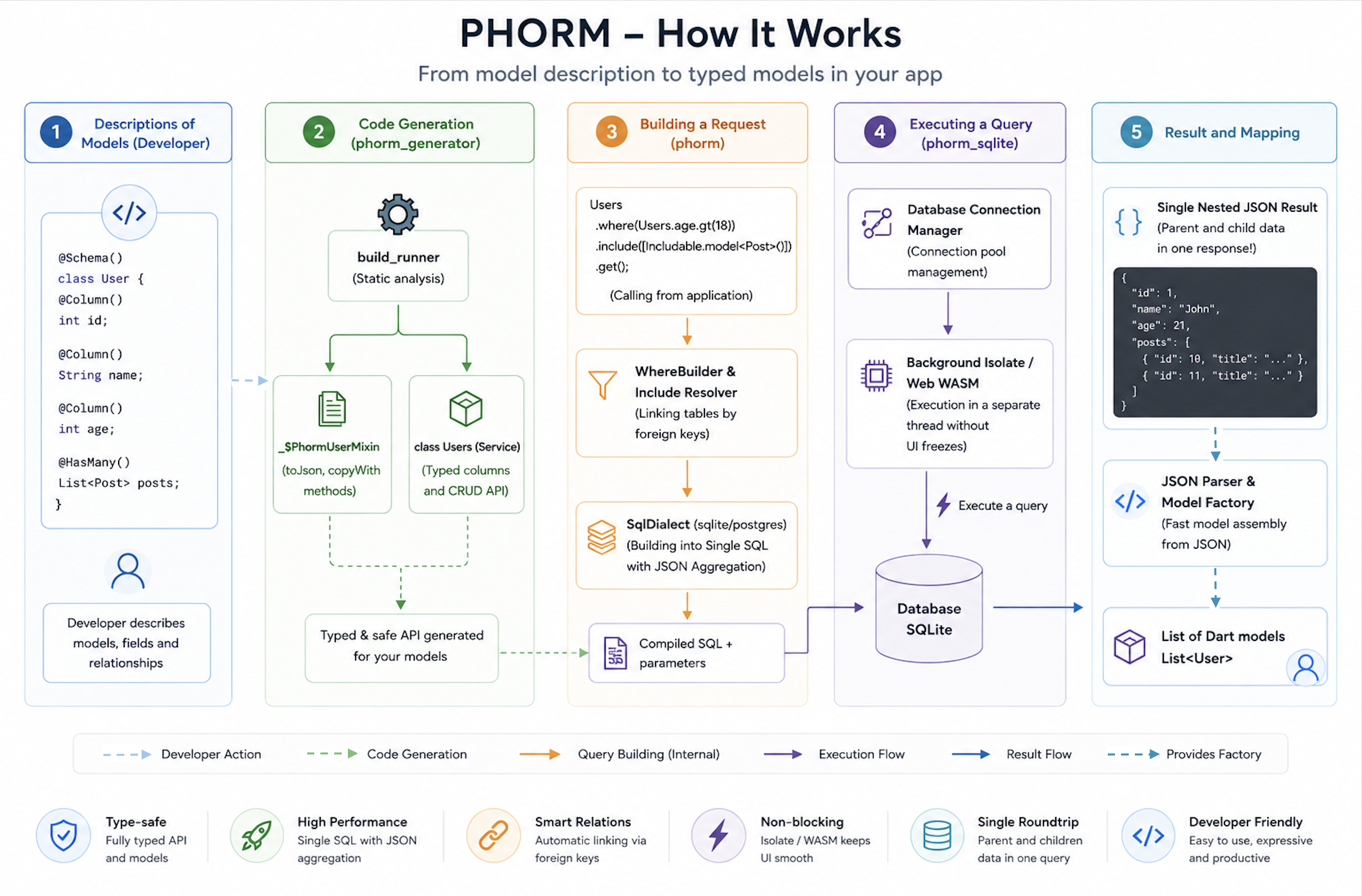
Dialects & Pluggable SQL Architecture
To ensure the library is future-proof and database-agnostic, PHORM separates query building and model mapping from the specific SQL grammar of target databases. It accomplishes this through the SqlDialect interface defined in phorm.
The query builder, JSON eager loading system, and column compiler in phorm never generate hardcoded database-specific SQL strings. Instead, they delegate to the active SqlDialect to resolve details like:
- Identifier Escaping: SQLite/Postgres uses
"table"."column", while MySQL uses`table`.`column`. - Positional Placeholders: SQLite uses
?, Postgres uses$1,$2, etc. - JSON Object Construction: SQLite compiles to
json_object('key', val), while Postgres compiles tojsonb_build_object('key', val). - JSON Array Aggregation: SQLite compiles to
(SELECT json_group_array(...) FROM ...), while Postgres compiles tocoalesce((SELECT jsonb_agg(...) FROM ...), '[]'::jsonb).
This makes it exceptionally easy to swap the underlying database driver without changing a single line of your application models or query builders.
Future Database Roadmap
PHORM's modularity paves the way for cross-platform, enterprise-ready database adapters:
| Driver Package | Target Database | Status | Dialect Implementation | Under-the-Hood Driver |
|---|---|---|---|---|
phorm_sqlite |
SQLite | Stable (Production-ready) | SqliteDialect (Single-query JSON aggregation, isolate ports, WebAssembly WASM, IndexedDB) |
sqlite3 & sqlite3_web |
phorm_postgres |
PostgreSQL | Planned | PostgresDialect (Positional $1 parameters, schema namespaces, JSONB arrays, binary aggregates) |
postgres (Dart) |
phorm_mysql |
MySQL / MariaDB | Planned | MysqlDialect (Backtick escapes, json_object, limit offsets) |
mysql_client / mysql1 |
When a new driver is introduced, your declarative schemas @Schema(...) and code-generated services (like Users) remain 100% identical. Only the database initialization (DB manager instantiation) changes!
Note
A Note on DDL Schemas:
While your Dart models and generated database services remain identical and fully database-agnostic at runtime, the DDL table schema automatically emitted by the phorm_generator currently targets SQLite-specific constructs (such as mapped types and SQLite trigger syntax for timestamps). For other databases, manual schema definitions or custom migration scripts should be used.
Package Structure
| Package | Role |
|---|---|
phorm_annotations |
Annotations (@Schema, @Column, @ID), data types, relationship definitions |
phorm |
Driver-agnostic runtime: PhormCore<T>, WhereBuilder, SortBuilder |
phorm_sqlite |
SQLite driver & connection manager: DB, isolates, WASM, custom SQL functions |
phorm_generator |
build_runner plugin that generates mixins, SQL, and serialization code |
Quick Install
dependencies:
  phorm_sqlite: ^1.0.0 # SQLite driver — automatically includes phorm core

dev_dependencies:
  phorm_generator: ^1.0.0 # Code generation (SQL schemas, toJson/fromJson)
  build_runner: ^2.4.0
Minimal Example
import 'package:phorm_sqlite/phorm_sqlite.dart';

// 1. Annotate your model
@Schema(tableName: 'users')
class User extends Model with _$PhormUserMixin {
  @ID()
  final String id;

  @Column()
  final String name;

  User({required this.id, required this.name});

  factory User.fromJson(Map<String, dynamic> json) => _$PhormUserFromJson(json);
}

// 2. Run the generator
// dart run build_runner build

// 3. Initialize app database once (from phorm_sqlite)
final appDb = DB(databaseName: 'app.db', version: 1, tables: [usersTable]);

// 4. Use the generated service class
await Users.insert(User(id: 'u1', name: 'Alice'));

final user = await Users.readOne('u1');

final list = await Users.where(Users.name.like('A%')).get();

final paged = await Users.readAllWithCount(limit: 20);
print('Page: ${paged.data.length} / Total: ${paged.count}');