Soft Deletes (Paranoid Mode)
Soft deletes allow you to "delete" records without physically removing them from the database. Instead, a deleted_at timestamp is set. This is useful for audit trails, undo functionality, and compliance requirements.
Enabling Soft Deletes
@Schema(
  tableName: 'users',
  paranoid: true,   // ← Enable soft deletes
)
class User extends Model with _$PhormUserMixin { ... }
The generator adds the deleted_at TEXT column to the SQL schema and injects a DateTime? deletedAt field into your generated mixin automatically. You can access it on your model instance without any manual declaration.
How It Works
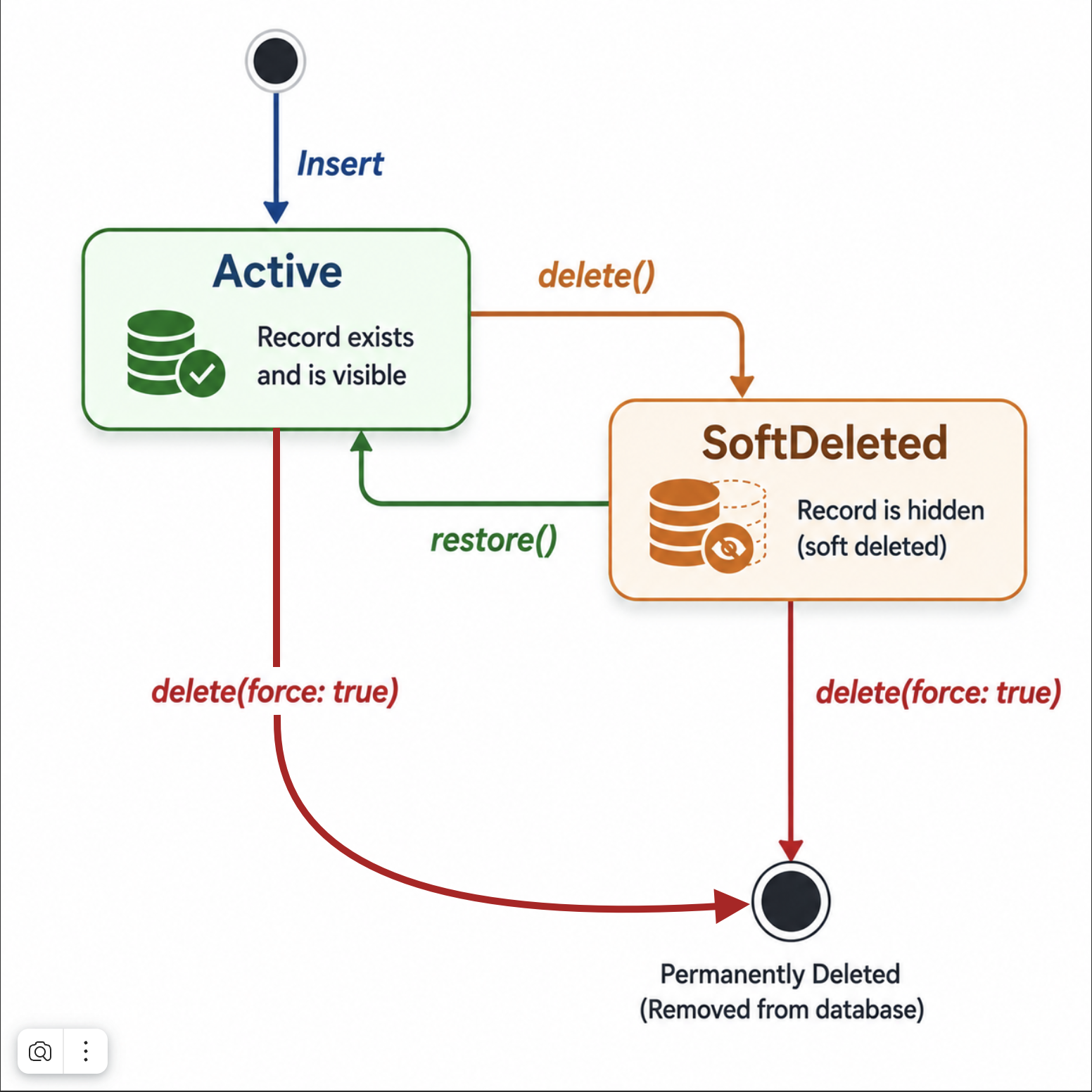
| Operation | paranoid: false |
paranoid: true |
|---|---|---|
delete(id) |
DELETE FROM ... WHERE id = ? |
UPDATE ... SET deleted_at = NOW() |
delete(id, force: true) |
DELETE FROM ... |
DELETE FROM ... (bypasses soft delete) |
readOne(id) |
Returns record | Returns null if deleted_at IS NOT NULL |
readAll() |
All records | Only records where deleted_at IS NULL |
readAll(withDeleted: true) |
All records | All records including deleted |
readAll(onlyDeleted: true) |
All records | Only records where deleted_at IS NOT NULL |
Reading Soft-Deleted Records
// Only active records (default)
final result = await userService.readAll();

// Include deleted records
final result = await userService.readAll(withDeleted: true);

// Only deleted records (e.g., for a "Trash" screen)
final result = await userService.readAll(onlyDeleted: true);

// Read a specific record regardless of deletion status
final user = await userService.readOne('id', withDeleted: true);

// Check if ID exists including deleted
final exists = await userService.exists('id', withDeleted: true);
Restoring Records
// Un-delete a record (clears deleted_at, updates updated_at)
await userService.restore('user_id');

// Bulk restore
await userService.restoreBatch(['id1', 'id2', 'id3']);
Warning
Calling restore on a table with paranoid: false throws StateError: Soft delete not enabled. Always check your table configuration.
Hard Delete
Even with paranoid: true, you can permanently delete a record:
// Permanent delete, bypasses soft delete
await userService.delete('user_id', force: true);

// Bulk hard delete
await userService.deleteBatch(['id1', 'id2'], force: true);
Custom deleted_at Field
If you want to customize the deletedAt field (e.g., to use a different column name or add specific annotations), you can declare it manually in your model class:
// Declare manually in your class for customization
@Column(columnName: 'removed_at')
final DateTime? deletedAt;
When declared manually, the generator will use your field instead of creating a default one in the mixin.
Pitfalls
1. Filtering on deleted_at manually
If you add a manual condition on deleted_at in your WhereBuilder, PHORM will not add the automatic IS NULL filter (it detects if deleted_at already has a condition):
// This works correctly — PHORM skips auto-filter because you set it manually
final result = await userService.readAll(
  where: WhereBuilder().isNotNull('deleted_at'),
);
2. upsert with soft-deleted records
upsert uses INSERT OR REPLACE. If the ID already exists (even with deleted_at set), the entire row is replaced — including deleted_at, which will be set by _withTimestamps as null. This effectively restores a soft-deleted record silently.
3. Relationship queries and soft-deleted related records
When using include (eager loading), related tables that are themselves paranoid are filtered automatically: the JSON subquery adds related.deleted_at IS NULL, so soft-deleted children do not appear in the loaded relationship. Related tables without paranoid: true are returned as-is.
To exclude soft-deleted related records, you would need a custom query approach.