Relationships & Eager Loading
PHORM provides three relationship types: HasMany, HasOne, and BelongsTo (plus Join as an alias). Relationships are declared in @Schema and resolved at runtime via a single optimized SQL query.
Relationship Types
| Type | Direction | Example | Returns |
|---|---|---|---|
HasMany |
One → Many | User has many Orders | List<T> (empty if none) |
HasOne |
One → One | User has one Profile | Map? (null if none) |
BelongsTo |
Many → One | Order belongs to User | Map? (null if none) |
ManyToMany |
Many ↔ Many | User belongs to many Roles | List<T> (empty if none) |
Join |
alias of BelongsTo |
Same as BelongsTo | Map? |
Note
For a detailed guide on setting up pivot tables and cross-references, see the Many-to-Many documentation.
Defining Relationships
@Schema(
  tableName: 'users',
  relationships: [
    HasMany(model: Order, foreignKey: 'user_id'),
    HasOne(model: Profile, foreignKey: 'user_id'),
  ],
)
class User extends Model with _$PhormUserMixin { ... }

@Schema(
  tableName: 'orders',
  relationships: [
    BelongsTo(model: User, foreignKey: 'user_id'),
  ],
)
class Order extends Model with _$PhormOrderMixin { ... }

@Schema(
  tableName: 'users',
  relationships: [
    ManyToMany(
      model: Role,
      pivotTable: 'user_roles',
      foreignKey: 'user_id',    // Key for current model in pivot
      relatedKey: 'role_id',    // Key for related model in pivot
    ),
  ],
)
class User extends Model with _$PhormUserMixin { ... }
Relationship Parameters
| Parameter | Type | Default | Description |
|---|---|---|---|
model |
Type or String |
required | Target model class or table name string |
foreignKey |
String |
required | The linking column |
localKey |
String |
'id' |
The local side column (usually primary key) |
Tip
While localKey defaults to 'id', the generator now automatically resolves the correct primary key name for BelongsTo relationships at build-time. For other relationship types, it is recommended to explicitly set localKey if your primary key is not named id.
ManyToMany Specific Parameters
| Parameter | Type | Default | Description |
|---|---|---|---|
pivotTable |
String |
required | Name of the join table |
relatedKey |
String |
required | Pivot column pointing to the related table |
relatedLocalKey |
String |
'id' |
Local key of the related table |
Example with Actions
HasMany(
  model: Order,
  foreignKey: 'user_id',
  onDelete: ReferentialAction.cascade, // Auto-delete orders when user is deleted
  onUpdate: ReferentialAction.cascade,
)
Tip
Use the ReferentialAction class for type safety when defining relationship actions (cascade, setNull, setDefault, restrict, noAction).
How It Works Internally
PHORM uses single-query JSON aggregation to avoid N+1 problems:
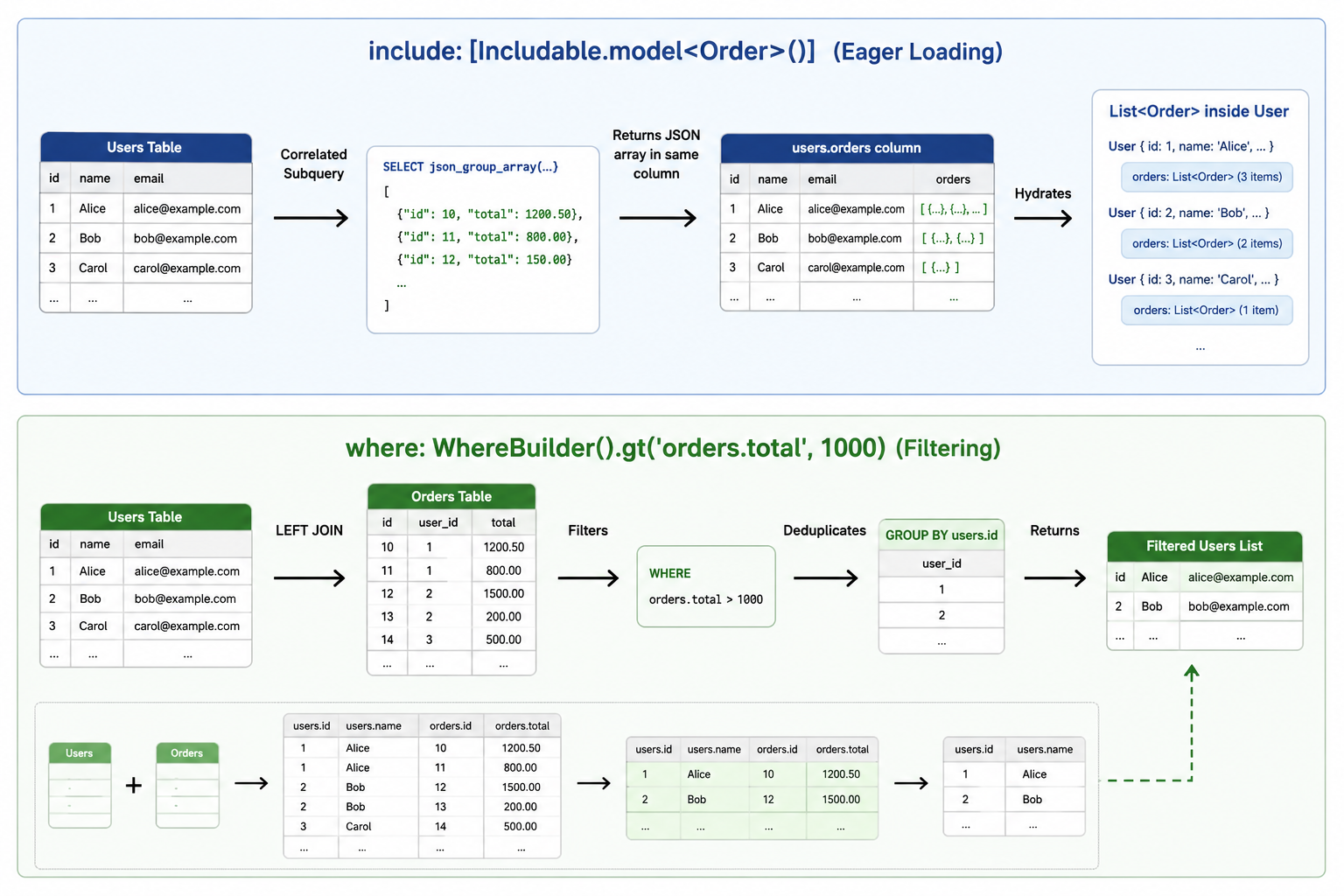
HasMany (JSON aggregation)
SELECT
  users.id,
  users.first_name,
  (SELECT json_group_array(json_object('id', orders.id, 'total', orders.total))
   FROM orders
   WHERE orders.user_id = users.id) AS orders
FROM users
WHERE users.deleted_at IS NULL
ManyToMany (JSON aggregation with JOIN)
SELECT
  users.id,
  users.name,
  (SELECT json_group_array(json_object('id', roles.id, 'title', roles.title))
   FROM roles
   INNER JOIN user_roles ON user_roles.role_id = roles.id
   WHERE user_roles.user_id = users.id) AS roles
FROM users
HasOne / BelongsTo (json_object subquery)
SELECT
  orders.id,
  orders.total,
  (SELECT json_object('id', users.id, 'first_name', users.first_name)
   FROM users
   WHERE users.id = orders.user_id) AS users
FROM orders
Important
Performance: JSON aggregation is efficient for moderate datasets. For very large HasMany collections (thousands of related rows), the JSON string can grow large. Consider using Attributes.include() on the relationship to limit columns.
Important
Index your foreign keys. Without an index on the child's FK column, the
aggregation subquery scans the child table once per parent row. Since
phorm_generator 1.5.0 the schema of a model declaring BelongsTo/Join
automatically includes CREATE INDEX IF NOT EXISTS <table>_<fk>_idx
(opt out with @Schema(indexForeignKeys: false)); auto-generated pivot
tables index their related key too. If only the parent declares HasMany
and the child model has no BelongsTo, add the index yourself via
@Schema(indexes: [...]) on the child. Existing databases pick new indexes
up on upgrade, or on any open with DB(autoMigrate: true).
Eager Loading (Includable API)
Use Includable in readOne and readAll to fetch related data.
By Model Type (recommended)
// Fetches user with all their orders
final user = await userService.readOne(
  'user_id',
  include: [Includable.model<Order>()],
);

// Bulk fetch with relationships
final result = await userService.readAll(
  include: [
    Includable.model<Order>(),
    Includable.model<Profile>(),
  ],
);
By Table Name (string)
// Useful when the model type is not available at compile time
final user = await userService.readOne(
  'user_id',
  include: [Includable.table('orders')],
);
With Column Filtering
final result = await userService.readAll(
  include: [
    Includable.model<Order>(
      // Include only specific columns for the related model
      attributes: Attributes.include(['id', 'total', 'created_at']),
    ),
    Includable.model<Profile>(
      // Exclude specific columns
      attributes: Attributes.exclude(['bio_html', 'internal_notes']),
    ),
  ],
);
Deep Loading (Nested Relationships)
PHORM supports loading relationships at any depth. Simply nest Includable objects inside each other.
// User -> Posts -> User (Author)
final user = await userService.readOne(
  'u1',
  include: [
    Includable.model<Post>(
      include: [
        Includable.model<User>(), // Nested include
      ],
    ),
  ],
);
Important
Deep loading is powered by recursive fromJson calls. SQLite generates a single JSON tree, and the ORM deserializes it into the full object graph.
Reading Related Data in fromJson
When a relationship is included, PHORM injects the related data into the JSON map before calling fromJson. The key is the related table name.
factory User.fromJson(Map<String, dynamic> json) {
  return User(
    id: json['id'] as String,
    firstName: json['first_name'] as String,

    // HasMany — always a List (empty if no related records)
    orders: (json['orders'] as List<dynamic>? ?? [])
        .map((o) => Order.fromJson(o as Map<String, dynamic>))
        .toList(),

    // HasOne — a Map or null
    profile: json['profiles'] != null
        ? Profile.fromJson(json['profiles'] as Map<String, dynamic>)
        : null,
  );
}
Warning
The key in json is always the SQL table name, not the Dart class name or field name.
HasMany(model: Order, ...)where Orders table is'orders'→ key isjson['orders']HasOne(model: Profile, ...)where Profiles table is'profiles'→ key isjson['profiles']
Filtering by Related Table Columns
You can filter the primary result set based on values in related tables using dot notation in WhereBuilder. PHORM automatically generates the necessary LEFT JOIN.
// Find users who have at least one order with total > 1000
final result = await userService.readAll(
  where: WhereBuilder().gt('orders.total', 1000),
);

// Find users with published posts containing 'Dart'
final result = await userService.readAll(
  where: WhereBuilder().like('posts.title', '%Dart%'),
);

// Combine cross-table and main-table filters
final result = await userService.readAll(
  where: WhereBuilder()
    .isTrue('users.is_active')
    .like('orders.status', 'completed%'),
);
Generated SQL:
SELECT users.*
FROM users
LEFT JOIN orders ON orders.user_id = users.id
WHERE orders.total > ? AND users.is_active = 1
GROUP BY users.id   -- prevents duplicates from the JOIN
Requirements for Automatic JOIN
- The referenced table (e.g.,
orders) must be defined in the model'srelationshipslist. - The related
Table<T>must be registered inDB(tables: [...]). - The
GROUP BYon the primary key is always added when any JOIN is generated. This deduplicated the results but may change behavior if you're using aggregation.
Cross-Table Filtering vs. Include — Key Difference
| Feature | include: [...] |
where: WhereBuilder().eq('table.col', ...) |
|---|---|---|
| Purpose | Load related data | Filter main records by related data |
| SQL type | Correlated subquery (json_object) | LEFT JOIN |
| Returns related data | ✅ Yes, embedded in result | ❌ No (only filters) |
| Affects main result count | ❌ No | ✅ Yes (only matching records returned) |
You can combine both:
// Return only users with published posts, AND load those posts
final result = await userService.readAll(
  where: WhereBuilder().eq('posts.status', 'published'),
  include: [Includable.model<Post>()],
);
Note
The include subquery and the LEFT JOIN from cross-table where are independent. The include uses a correlated subquery, not the JOIN. The JOIN is only for the WHERE clause evaluation.
Common Pitfalls
1. Relationship not in DB(tables: [...])
// If OrdersTable is missing from DB init, Includable.model<Order>() will throw:
// ArgumentError: Table for model type Order not found in registered tables.
Always register all related tables in DB(tables: [...]).
2. Wrong fromJson key
// Table name is 'user_orders', NOT 'orders'
orders: json['user_orders'] as List, // ✅ use the actual SQL table name
orders: json['orders'] as List,      // ❌ wrong if table name differs
3. HasMany returns null instead of []
// WRONG — crashes if no orders exist
final orders = json['orders'] as List;

// CORRECT — always provide a fallback
final orders = (json['orders'] as List<dynamic>? ?? [])
    .map((o) => Order.fromJson(o as Map<String, dynamic>))
    .toList();
4. Filtering + HasMany duplication without GROUP BY
PHORM automatically adds GROUP BY when cross-table filtering is detected. If you use .raw() to write a manual JOIN, be aware that no automatic GROUP BY is added — you must handle deduplication yourself.