DB Manager & Migrations
The DB class (provided by the phorm_sqlite package) manages the database connection lifecycle and schema migrations. It is built on top of sqlite3 with an isolate-based architecture for non-blocking database operations, and adds a smart, idempotent migration tracking system using an internal __phorm_migrations table.
Creating a DB Instance
To use the database manager, import phorm_sqlite:
Manual Version
final db = DB(
  databaseName: 'my_app.db',  // Stored at platform's default path
  version: 3,                  // Must be >= all migration versions
  tables: [usersTable, ordersTable],
);
Warning
If any table has a migration with targetVersion > version, DB throws ArgumentError at construction time. Always increment version when adding new migrations.
Auto Version (Recommended)
Automatically determines the version as the maximum across all table migrations.
final db = DB.autoVersion(
  databaseName: 'my_app.db',
  tables: [usersTable, ordersTable],
);
// db.version == max(migration.targetVersion across all tables)
In-Memory (for Testing)
Lazy Initialization
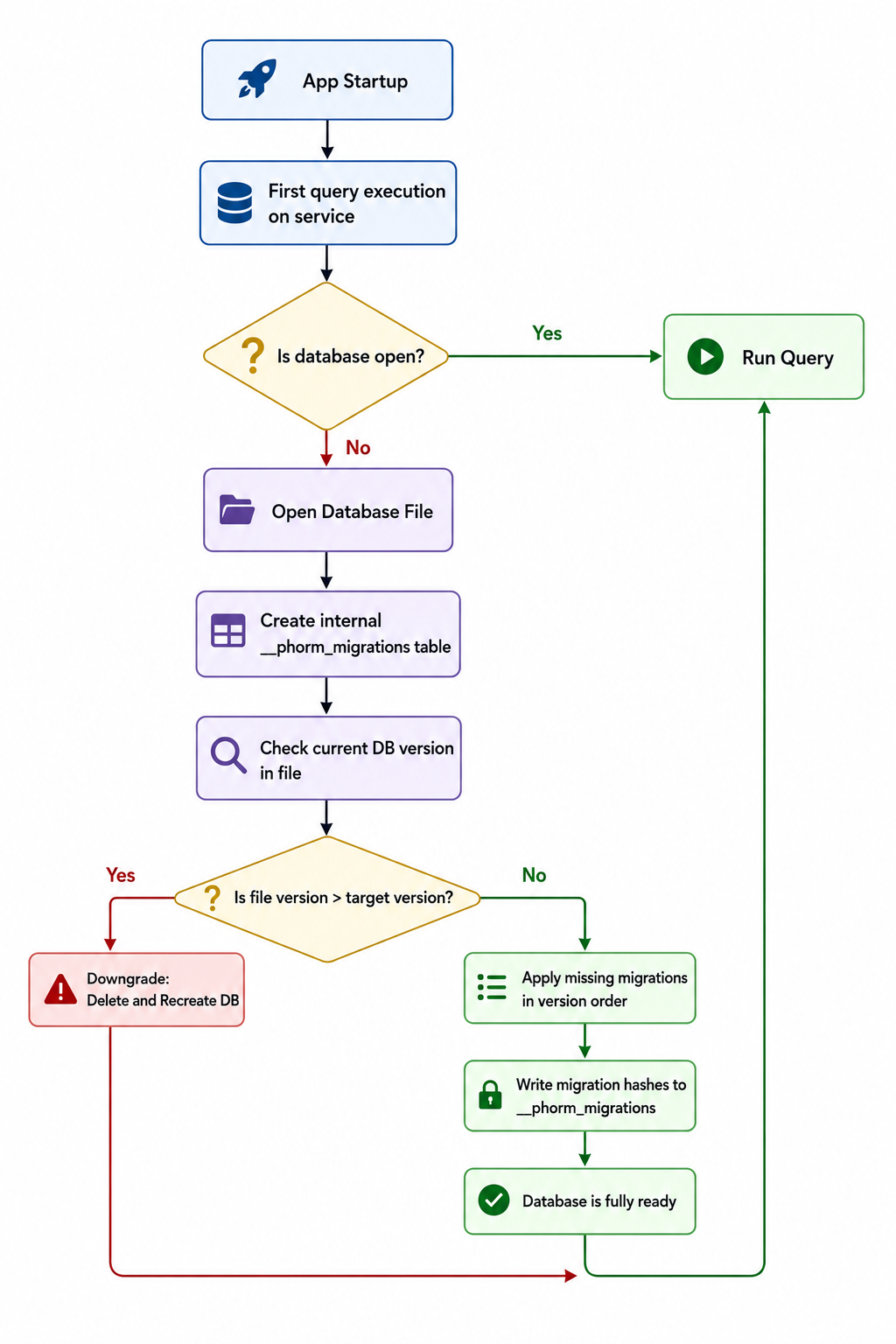
The database connection is established lazily on first access. You don't need to call any init() method explicitly. The first operation on any PhormCore service triggers the database open.
During initialization, the DB class:
- Creates the
__phorm_migrationstracking table. - Creates all registered tables from their
schemastrings. - Applies any pending migrations.
Migration System
PHORM uses a versioned, idempotent migration system. Each migration is tracked by a hash in the __phorm_migrations table and will never be applied twice.
Defining Migrations
Migrations are defined using MigrationBuilder on a Table object.
final usersTable = Table<User>(
  name: 'users',
  schema: 'CREATE TABLE users (id TEXT PRIMARY KEY, name TEXT NOT NULL)',
  fromJson: User.fromJson,
).migrate()
  .addColumn(name: 'email', type: 'TEXT', version: 2)
  .addColumn(name: 'age', type: 'INTEGER', version: 2)
  .createIndex(name: 'idx_email', columns: ['email'], unique: true, version: 3)
  .build(); // Returns Table<User> with migrations attached
Available Migration Operations
| Method | SQL Generated | Parameters |
|---|---|---|
.addColumn(...) |
ALTER TABLE ... ADD COLUMN ... |
name, type, version, defaultValue?, nullable? |
.createIndex(...) |
CREATE INDEX IF NOT EXISTS ... |
name, columns, version, unique? |
.dropIndex(...) |
DROP INDEX IF EXISTS ... |
name, version |
.custom(...) |
Custom SQL | description, version, migrate callback |
Tip
addColumn's type is a plain SQL type string — e.g. 'TEXT', 'INTEGER',
'REAL', 'VARCHAR(255)'. (The old SqlTypes.* constants are deprecated.)
// Custom migration (arbitrary SQL)
.custom(
  description: 'Populate full_name from first+last',
  version: 4,
  migrate: (executor, table) async {
    await executor.execute(
      "UPDATE users SET full_name = first_name || ' ' || last_name",
    );
  },
)
Version Lifecycle
DB version 1 → onCreate → creates all tables, applies migrations v<=1
DB version 2 → onUpgrade → applies migrations where v>oldVersion && v<=newVersion
DB version 2 → same version → no migrations applied (already tracked)
Important
Migrations are applied in version order, then by priority within the same version. Default priority is 0. Lower priority number = applied first.
Automatic Additive Migrations (autoMigrate)
For purely additive model changes you can skip writing migrations entirely:
final db = DB.autoVersion(
  databaseName: 'app.db',
  tables: [usersTable, postsTable],
  autoMigrate: true, // off by default
);
On every open PHORM compares each table's live schema (PRAGMA table_info,
sqlite_master) with its generated CREATE TABLE schema and applies the safe
difference — no version bump required:
| Change in your model | What happens |
|---|---|
New @Schema model registered |
Table is created |
New nullable / defaulted @Column |
ALTER TABLE ... ADD COLUMN is executed |
| New index / trigger in the schema | Created if missing (checked by name) |
| Removed field | ⚠️ Column kept as-is, warning logged |
NOT NULL column without DEFAULT |
⚠️ Skipped, warning logged |
UNIQUE / PRIMARY KEY column |
⚠️ Skipped (SQLite ADD COLUMN limitation) |
| Type change / rename | ⚠️ Not detected — write an explicit migration |
Everything marked ⚠️ requires an explicit TableMigration — auto-migration is
strictly non-destructive and will never touch existing data. Explicit
migrations keep working alongside autoMigrate and remain the right tool for
data transforms (backfills, renames, type changes).
DB Utility Methods
// Get list of all applied migrations (useful for debugging)
final history = await db.getAppliedMigrations();
// Returns: [{table_name, migration_version, description, applied_at}, ...]

// Get actual version stored in the database file
final fileVersion = await db.getCurrentFileVersion();

// Manually sync migration history (edge case)
await db.synchronizeHistory();

// Close the connection
await db.close();

// Delete and recreate the database (⚠️ TESTING ONLY)
await db.reset();
Resolving Services / Repositories
To simplify Developer Experience (DX) and avoid manually passing tables and database managers, you can resolve a PhormCore<T> service directly from the DB manager using the db.service<T>() method:
final db = DB.autoVersion(
  databaseName: 'app.db',
  tables: [usersTable, ordersTable],
);

// Resolves PhormCore<User> and PhormCore<Order> automatically
final userService = db.service<User>();
final orderService = db.service<Order>();
Note
The generic type T must correspond to a model of a Table registered in this DB instance. If the model type is not registered, a StateError is thrown.
Downgrade Behavior
Caution
SQLite does not support native schema downgrades. When DB.version is lower than the version stored in the database file, PHORM deletes and recreates the database from scratch, losing all data.
Never decrease version in production. Use this only for local development resets.
Foreign Keys
PHORM enables PRAGMA foreign_keys = ON on every database open via onConfigure. This means:
- SQLite enforces referential integrity on your
FOREIGN KEYconstraints. - Deleting a parent row that has related children will fail unless you've defined
ON DELETE CASCADE.
Note
The @Schema annotation and phorm_generator automatically generate FOREIGN KEY constraints in the CREATE TABLE SQL based on your relationships definition. There is no need to add them manually in the schema string.
__phorm_migrations Table
PHORM creates this internal table automatically:
CREATE TABLE IF NOT EXISTS __phorm_migrations (
  id INTEGER PRIMARY KEY AUTOINCREMENT,
  table_name TEXT NOT NULL,
  migration_version INTEGER NOT NULL,
  migration_hash TEXT NOT NULL,
  description TEXT,
  applied_at TEXT NOT NULL,
  UNIQUE(table_name, migration_version, migration_hash)
)
A migration is identified by (table_name, migration_version, migration_hash). If you modify a migration's SQL or description, the hash changes and the migration will be re-applied.
Warning
Do not manually modify the __phorm_migrations table. Corrupting it can cause migrations to be skipped or applied twice.
Complete Example
import 'package:phorm_sqlite/phorm_sqlite.dart';

// Define tables
final usersTable = Table<User>(
  name: 'users',
  schema: '''
    CREATE TABLE users (
      id TEXT PRIMARY KEY,
      first_name TEXT NOT NULL,
      email TEXT UNIQUE,
      created_at TEXT NOT NULL,
      updated_at TEXT,
      deleted_at TEXT
    );
    CREATE INDEX idx_users_email ON users(email);
  ''',
  fromJson: _$PhormUserFromJson,
  // These values are typically generated automatically!
  // The primaryKey is detected from the @ID annotation.
  primaryKey: 'id',
  paranoid: true,
  timestamps: true,
  columns: ['id', 'first_name', 'email', 'created_at', 'updated_at', 'deleted_at'],
).migrate()
  .addColumn(name: 'age', type: 'INTEGER', version: 2)
  .createIndex(name: 'idx_users_created', columns: ['created_at'], version: 3)
  .build();

// Create DB with auto-version
final db = DB.autoVersion(
  databaseName: 'production.db',
  tables: [usersTable],
);

// Create service (Recommended)
final userService = db.service<User>();